
Matching Mechanics
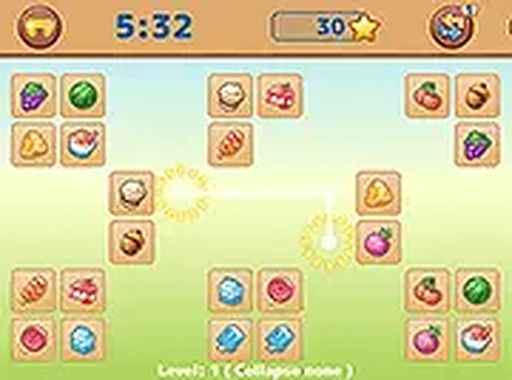
Confectionery Connect Puzzle presents players with a grid of tiles, each decorated with a distinct dessert illustration. The objective is to remove all tiles by selecting two identical images. However, a valid match requires that the two tiles can be connected by a path that makes no more than two turns, and this path cannot cross over any other tiles. This rule adds a layer of spatial reasoning to the classic matching concept, encouraging players to think ahead rather than just scan randomly.
Board Dynamics
As players advance through the stages, they encounter boards that shift after each successful match. In certain layouts, removing a pair causes the tiles above to fall into the newly empty spaces, altering the arrangement. This collapsing effect introduces a puzzle element where each move changes the playing field, requiring quick reassessment. The challenge comes not from speed alone but from adapting to a constantly evolving board.
Progression and Difficulty
The game features multiple stages, each with a unique tile layout. Early boards are simple, with few tiles and straightforward paths, allowing new players to learn the connection rules. Later stages introduce denser grids and more complex arrangements, where finding a valid pair becomes a test of observation. A gentle timer adds a sense of urgency without overwhelming the player, making each stage a manageable challenge.
Visual Design and Atmosphere
Each tile is illustrated with a different dessert, from cakes to candies, rendered in bright, appealing colors. The art style is clean and cheerful, creating a relaxed atmosphere suitable for players of all ages. The interface is uncluttered, with clear visual feedback when tiles are selected or matched. This focus on clarity helps maintain the game's casual feel, allowing players to concentrate on the puzzle.
Platform and Accessibility
Confectionery Connect Puzzle runs directly in a web browser, so there is no software to install. It is fully responsive, adapting to both desktop monitors and mobile screens. A full-screen mode is available for those who prefer an immersive view. Controls are simple: click with a mouse or tap with a finger. No registration or personal data is required to play, making it easy to start a session at any time.







Comments
0 comments