
Arena Combat Fundamentals
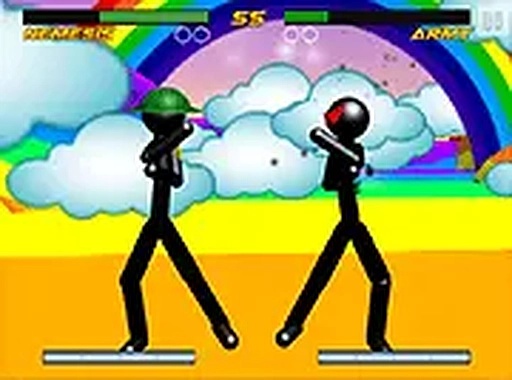
This browser-based fighting game places players in control of a stick figure within a three-dimensional space. The core objective is to reduce an opponent's health bar to zero using a combination of strikes and defensive maneuvers. Unlike flat 2D fighters, the 3D environment adds a layer of spatial awareness, requiring players to manage distance and angles. Each arena has a unique layout, with platforms or barriers that can be used strategically. The game emphasizes timing and positioning over rapid button presses, rewarding players who think before they act.
Character Selection and Variation
Before each match, players can choose from a roster of stick figures. Each character has a distinct visual appearance, suggesting different attributes or fighting styles. While the game does not explicitly detail stats, the variety allows players to experiment and find a fighter that matches their preferred approach. Some characters may excel at close-range pressure, while others might be better suited for keeping opponents at a distance. This selection process adds a layer of strategy before the fight even begins.
Physics and Movement
The game uses a physics system that affects how punches and kicks land. A well-timed strike can send an opponent stumbling backward, while a poorly aimed attack leaves the player vulnerable. Movement is controlled via keyboard keys, typically the WASD or arrow keys for navigation. Dedicated keys are used for attacking and defending. The physics engine makes each encounter feel slightly unpredictable, as the momentum of a fight can shift with a single well-placed hit. Players must learn to control their character's momentum to avoid being knocked into a corner.
Visual and Audio Presentation
Visually, the game presents a clean, uncluttered style. The stick figures are simple but clearly animated, making their actions easy to read. The 3D arenas are designed with distinct color schemes and obstacles, helping each location feel different. The audio is functional, providing feedback for hits and other key events without being distracting. The overall presentation focuses on clarity, ensuring players can always track their character and opponent during fast-paced exchanges.
Accessibility and Platform
Designed for desktop play, the game requires a keyboard for optimal control. It runs directly in a web browser with no software installation needed. A full-screen mode is available for a more immersive view. The game is free to play, making it accessible to anyone with an internet connection. The controls are responsive, and the learning curve is gentle enough for newcomers while offering depth for those who want to master the mechanics.



Comments
0 comments