
Core Gameplay Loop
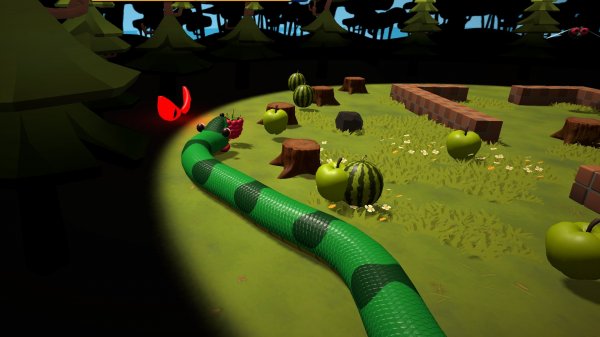
Players control a continuously moving line that grows longer each time it collects a floating item. The goal is to navigate through a three-dimensional arena filled with obstacles and moving threats. As the line extends, turning becomes more demanding, requiring careful planning and quick reactions. The experience is built around a simple cause-and-effect: collect to grow, but avoid contact with anything that ends the run.
Visual Style & Atmosphere
The game presents a colorful, low-poly world with a nostalgic feel. Bright neon accents against darker backgrounds help items and hazards stand out clearly. The 3D perspective gives players a better sense of depth, making it easier to judge distances when weaving through tight spaces. The overall look is clean and inviting, suitable for players of all ages.
Controls & Accessibility
On desktop, movement is handled with the WASD or arrow keys. Mobile users can drag on the screen or use touch gestures to steer. The controls are responsive and easy to learn, allowing newcomers to start playing immediately. The interface is minimal, keeping the focus on the action without clutter. This design makes the game accessible for quick breaks or longer play sessions.
Difficulty & Progression
The challenge increases naturally as the line grows longer. Early rounds are forgiving, letting players learn the movement and item placement. Later stages require sharper turns and faster decisions to avoid hazards. There is no fixed endpoint, so each session offers a new attempt to beat a personal best score. This gradual ramp keeps the experience engaging without becoming frustrating.
Strategic Approaches
Experienced players learn to prioritize items in open areas before attempting narrow corridors. Timing turns to avoid moving hazards becomes essential as the line lengthens. Quick, deliberate movements are more effective than constant direction changes. The 3D view helps in spotting upcoming obstacles, giving players a split second to adjust their path. Regular play improves spatial awareness and reaction speed.







Comments
0 comments