
Game Introduction
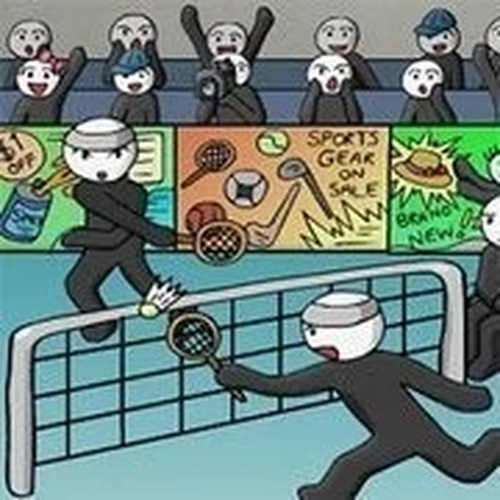
Stick Figure Badminton Sports Game brings the classic sport of badminton to your screen with a minimalist stick figure art style. The core objective is to outscore your opponent by hitting the shuttlecock over the net and landing it in their court. Designed for quick, engaging matches, this game focuses on straightforward mechanics and responsive controls, making it accessible for players of all ages. The simple visuals keep attention on the action, offering a pure arcade sports experience that is easy to pick up and play. This game is ideal for casual sessions or short breaks, providing a fun way to enjoy a virtual badminton match.
How to Play
Players control a stick figure character on the badminton court. Using keyboard inputs such as arrow keys or WASD, you move your character into position. A dedicated key or button is used to swing the racket, and another to jump, allowing you to reach high shots. Alternatively, mouse controls may be available, where moving the mouse positions your character and clicking swings the racket. The goal is to time your swings and jumps to return the shuttlecock over the net, aiming to land it in your opponent’s half to score points. Rallies continue until one player fails to return the shuttlecock within the court boundaries.
Game Features
This arcade game includes a 2-player mode, allowing you to compete against a friend on the same device. The controls are designed to be intuitive, with keyboard and mouse support for flexible play. Matches are fast-paced and short, making them ideal for quick breaks or casual sessions. The minimalist stick figure art style keeps the focus on gameplay, while responsive controls ensure every swing and jump feels satisfying. Family-friendly content makes it suitable for players of all ages, and the simple mechanics provide a low barrier to entry while still offering engaging rallies.
Tips for Success
To improve your performance, focus on timing your swings carefully—hitting the shuttlecock at the right moment is more important than swinging wildly. Use jumps to reach high shots and to add variety to your returns. Practice moving your character efficiently to cover the court, as good positioning reduces the need for last-second dives. Observe your opponent’s patterns and try to aim the shuttlecock to the opposite side of where they are standing. Finally, stay calm during rallies; patience and consistent returns often lead to scoring opportunities.



Comments
0 comments